Search contracts
Ask a question in plain language on an employer's Contracts tab and get the article that answers it.
What contract search is
Contract search reads the agreements you have filed and answers a question with the passage that settles it. You type the question the way a member asks it at the counter — "how much notice before a schedule change?" — and you get back the articles that answer it, each one named by its heading and quoted in full.
It searches by meaning, not by exact words. Asking about "time off for a funeral" finds the bereavement article even where the agreement never uses the word funeral. That is the difference between this and pressing Ctrl+F in a PDF, and it is why a steward who has never read a 90-page agreement can still answer a question from it.
There is no separate search screen. The question is asked where the agreements already are: on the employer's Contracts tab. That is also how a question usually arrives — a member at one store asking about their own contract.
Ask a question about an employer's agreements
- Open the employer and choose the Contracts tab.
- Type your question in the box above the list and press Search. Whole questions work better than single words: "how long do I have to file a grievance?" beats "grievance".
- The passages that answer it appear above the agreements, each under the article it comes from.
- Press Copy to put the passage on your clipboard, heading and all, ready to paste into a grievance or an email. Press Open the contract to read the agreement around it.
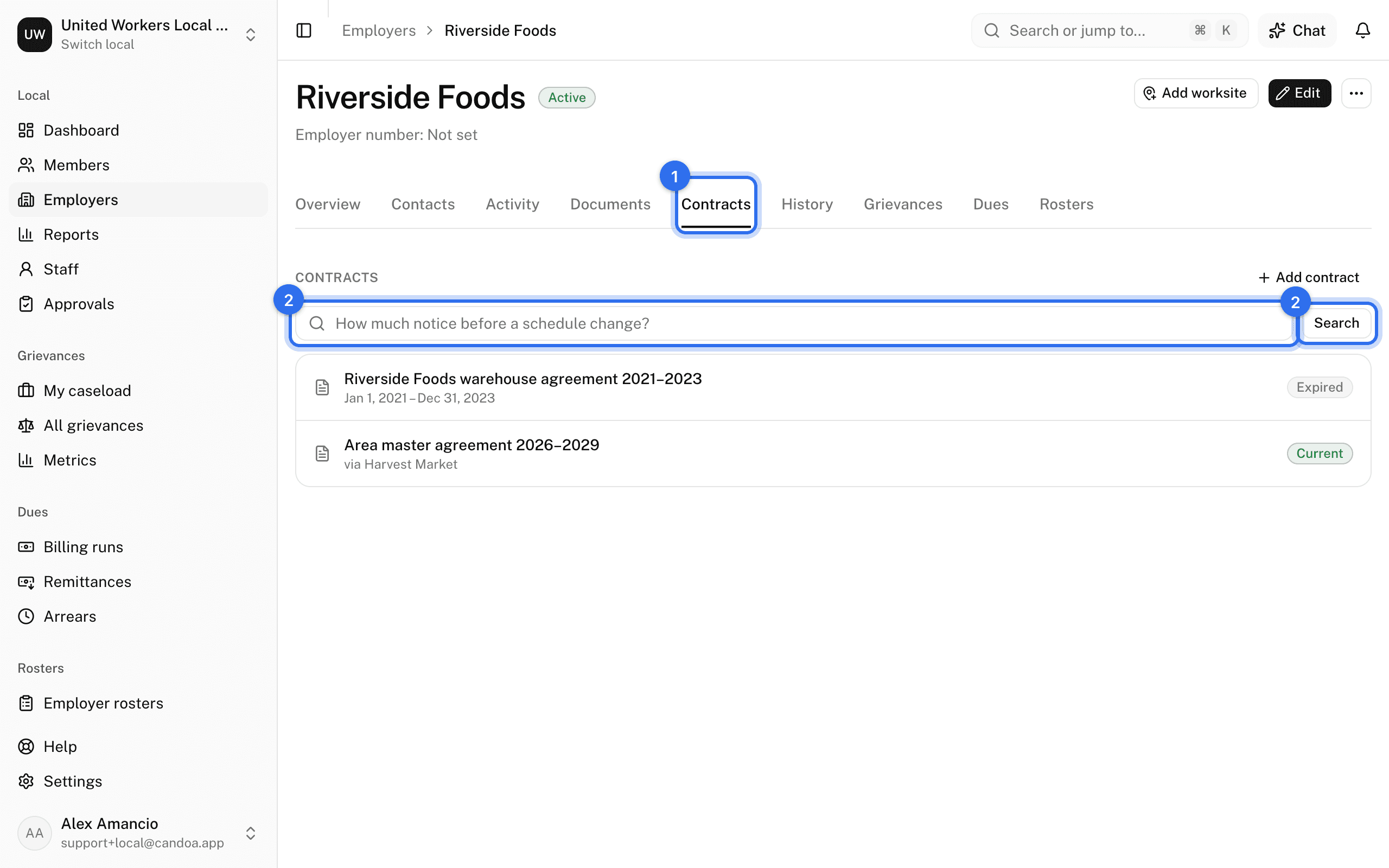
The search covers every agreement that covers this employer, including a master agreement it is only a party to. An answer has an address of its own, so you can bookmark a question you ask every week, or send a steward the link.
Ask about every agreement at once
For a question that is not about one employer — "which of our contracts have a four-day bereavement clause?" — ask Eli. Press Cmd+J (Ctrl+J elsewhere) on any screen and ask in the same plain language. Eli reads the same agreements and quotes the article it found. See Ask Eli.
When an agreement isn't searchable yet
An agreement is read for search the moment it's filed, so usually there is nothing to do. Now and then that reading fails, and the agreement is kept but can't be searched until it has been read.
If some of an employer's agreements are still waiting, the Contracts tab says so under the box, and those agreements are left out of the answer until they are read.
Whoever files agreements can read them straight away under Settings › Contracts:
- The panel says Some contracts aren't searchable yet, with how many of them can be searched so far.
- Press Read them now. The count climbs as it works through them; a long shelf takes a few minutes.
- You can leave at any point. Anything still waiting is read overnight, and it is never read twice.
- If a few agreements could not be read, it says how many and tonight's run tries them again. The usual reason is an agreement filed as a scanned PDF with no text behind it — paste its text into the contract record and it will be read on the next run.
Why a search finds nothing
- The agreement has no text on file. A scan with no readable text has nothing to search. Open the contract and paste its text in.
- The agreement has not been read yet. The Contracts tab says so under the box; see above.
- The question names something the agreement does not cover. Try naming the thing itself — call-in pay, bereavement, probation — or ask it the way the agreement would put it.
Who can use it
Anyone who can read contracts, which is every permission by default, on any employer they can open. The local's owner can change that under Settings › Permissions; see Permissions.
Every local has contract search. There is nothing to switch on and nothing extra to pay.
These pages are the help for Candoa, the software a local runs its members, employers, and grievances on.
Set up your localUpdated 2026-09-19