Permissions
The seven permissions, what each one can do out of the box, and how an owner changes them.
Every staff account has one permission in each local. A permission is a set of permissions. Candoa ships seven permissions named after the jobs at a union local, and the owner or an admin can adjust what the lower six may do in Settings › Permissions.
The seven permissions
- Owner: the person who created the local. Can do everything, always. There is exactly one, nobody else can demote them, and the permission is never handed out from the Staff screen.
- Admin: runs the local. Everything except switching add-ons on and off.
- Agent: works the roster and the cases. Adds and edits members and employers, sees and adds their documents, imports, exports, opens reports, signs members up, and files and edits grievances.
- Treasurer: keeps the money. Sets dues rates, classes, and assessments, takes payments, works the employers' remittances, writes off and refunds, and opens reports. Reads the local to do that job and proposes changes to members and employers rather than making them. No grievance casework, no staff, and no settings beyond dues.
- Staff: keeps the roster. Adds and edits members and employers, accepts or rejects proposed changes and joins, imports, exports, merges duplicates, opens reports, signs members up, and sees and adds documents on records. Reads grievances but doesn't file or edit them, and doesn't manage staff, settings, or contracts.
- Steward: proposes changes to members and employers rather than making them, opens reports, signs members up, and files grievances. Does not see the documents on a member, employer, or worksite.
- Read-only: sees the roster, employers, contracts, and grievances one record at a time, and does nothing else — the trustee mid-audit, the local's attorney, the rep who needs to look. No reports, no documents on members, employers, or worksites, and nothing it does leaves a trace. A local that wants its readers proposing changes ticks the two propose rows on.
Signing members up and accepting joins need the Join add-on; the dues rows need the Dues add-on; the communications rows need the Communications add-on. With the Rosters add-on, anyone who can see members can read employer rosters, and filing, deciding, and applying them goes with adding and editing members. The permissions above say who may once each one is on, and the rows for an add-on a local doesn't have change nothing for it.
Stewards and treasurers propose edits rather than making them. An approver accepts or declines them on the Approvals screen. See Approvals.
Seeing a record is not the same as seeing its documents. The Documents tab on a member, an employer, or a worksite has its own two permissions, so a permission can read the roster without opening every signed card and letter. A contract's PDF goes with the contract record.
What each permission means
Members
- See the roster and each member's record.
- Add members, edit records, change status.
- Edit a member's record, with the change waiting for an approver.
- Accept or reject proposed changes to members.
- Download the roster as a spreadsheet.
- Import members from a spreadsheet.
- Merge duplicate member records.
- Sign members up on a device, by link, or from a paper card.
- See a member's documents.
- Add, relabel, and delete a member's documents.
Employers
- See employers and worksites.
- Add and edit employers and worksites.
- Edit employers and worksites, with the change waiting for an approver.
- Accept or reject proposed changes to employers and worksites.
- Delete employers and worksites nothing points at.
- See documents on employers and worksites.
- Add, relabel, and delete documents on employers and worksites.
Contracts
- See contract records and their document.
- Add and edit contract records.
- Delete contract records.
Reports
- See reports and download them as spreadsheets. Sharing a report with the office also needs "Add members, edit records, change status".
Grievances (only with the Grievances add-on)
- See every grievance.
- File a grievance.
- Edit any grievance, not only assigned ones.
- Delete and restore grievances.
- Procedures, numbering, and grievance settings.
Dues (only with the Dues add-on)
- See rates, bills, and where each member stands.
- Take payments, work an employer's remittance, and sign members up for an assessment.
- Rates, assessments, dues classes, and the local's dues rules.
Communications (only with the Communications add-on)
- See the Inbox, each member's conversation, and every announcement with what happened to it.
- Text and email members, note calls, and send announcements.
Staff and settings (locked, see below)
- Invite staff, change permissions, remove accounts.
- Change the local's profile and permissions.
- Add, rename, refile, and delete the documents the local publishes, under Settings › Documents.
- Switch add-ons on and off.
Out of the box
| Permission | Owner | Admin | Agent | Treasurer | Staff | Steward | Read-only |
|---|---|---|---|---|---|---|---|
| See members, employers, contracts, grievances | yes | yes | yes | yes | yes | yes | yes |
| Add and edit members | yes | yes | yes | yes | |||
| Propose member changes | yes | yes | yes | ||||
| Approve member changes | yes | yes | yes | ||||
| Export members | yes | yes | yes | yes | |||
| Import members | yes | yes | yes | yes | |||
| Merge duplicates | yes | yes | yes | ||||
| Sign members up | yes | yes | yes | yes | yes | ||
| See a member's documents | yes | yes | yes | yes | |||
| Add, relabel, and delete a member's documents | yes | yes | yes | yes | |||
| Add and edit employers | yes | yes | yes | yes | |||
| Propose employer changes | yes | yes | yes | ||||
| Approve employer changes | yes | yes | yes | ||||
| Delete employers | yes | yes | |||||
| See documents on employers and worksites | yes | yes | yes | yes | |||
| Add, relabel, and delete documents on employers | yes | yes | yes | yes | |||
| Add and edit contracts | yes | yes | |||||
| Delete contracts | yes | yes | |||||
| Open reports | yes | yes | yes | yes | yes | yes | |
| File a grievance | yes | yes | yes | yes | |||
| Edit any grievance | yes | yes | yes | ||||
| Delete grievances | yes | yes | |||||
| Grievance settings | yes | yes | |||||
| See dues | yes | yes | yes | yes | yes | ||
| Take dues payments | yes | yes | yes | yes | |||
| Dues settings | yes | yes | yes | ||||
| See the Inbox and announcements | yes | yes | yes | yes | |||
| Text, email, and send announcements | yes | yes | yes | yes | |||
| Manage staff | yes | yes | |||||
| Manage settings | yes | yes | |||||
| Manage add-ons | yes |
Changing what a permission can do
Open Settings › Permissions. You need to be an owner or admin.
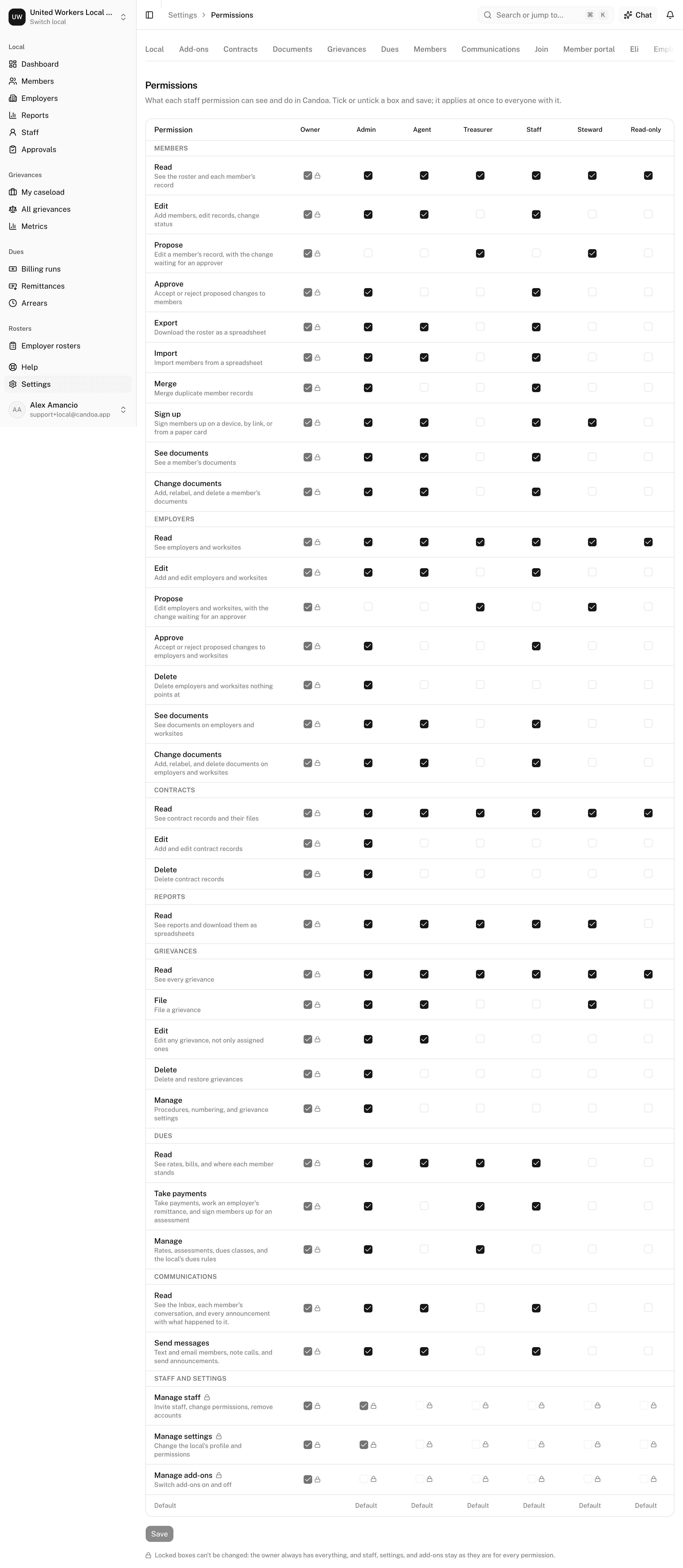
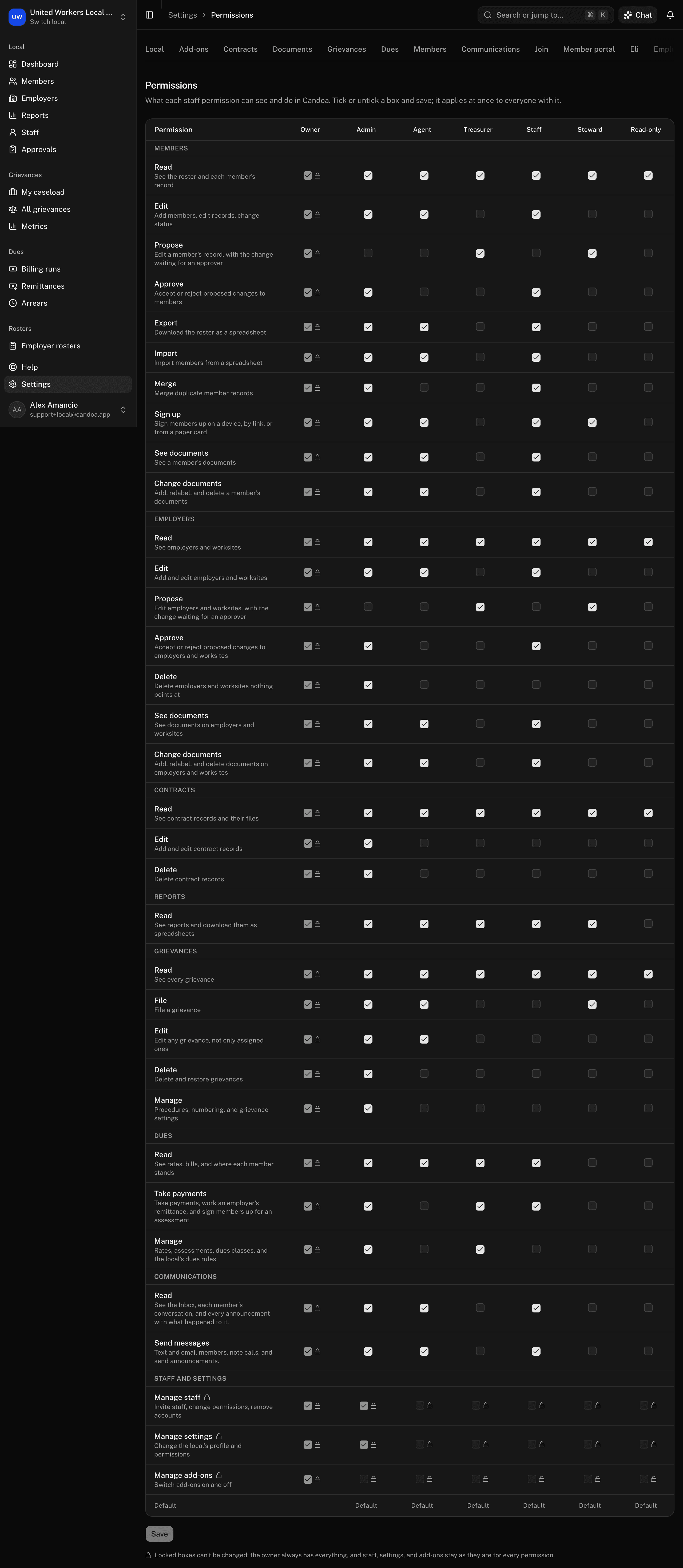
Tick or untick a box and press Save (or Cmd+S). It takes effect right away for everyone in that permission. Changed permissions show a Modified badge at the bottom of their column; Reset to defaults puts one back the way Candoa ships it.
Some boxes are locked and can't be changed: the whole Owner column, and the three rows for managing staff, settings, and add-ons. Who does those jobs is fixed per permission.
See the app as another permission
An owner or admin can look at the local the way a lower permission sees it, to check what a steward or an agent gets before handing the permission out.
- Click your name at the bottom of the sidebar.
- Point at View as and pick a permission. An admin can pick any role except Owner.
- The dashboard opens as that permission: the sidebar, the screens, and the buttons are what that permission has. The menu shows the permission in use next to View as.
- To be yourself again, open View as and pick your own permission. Switching to another local also puts you back.
Only what you may do changes. Anything you save is still recorded under your own name.
Access limits are separate
A permission says what someone can do. An access limit says which employers and worksites they can see. Both are set on the Staff screen.
These pages are the help for Candoa, the software a local runs its members, employers, and grievances on.
Set up your localUpdated 2026-09-19